

The hardest part of a public program isn’t the decision
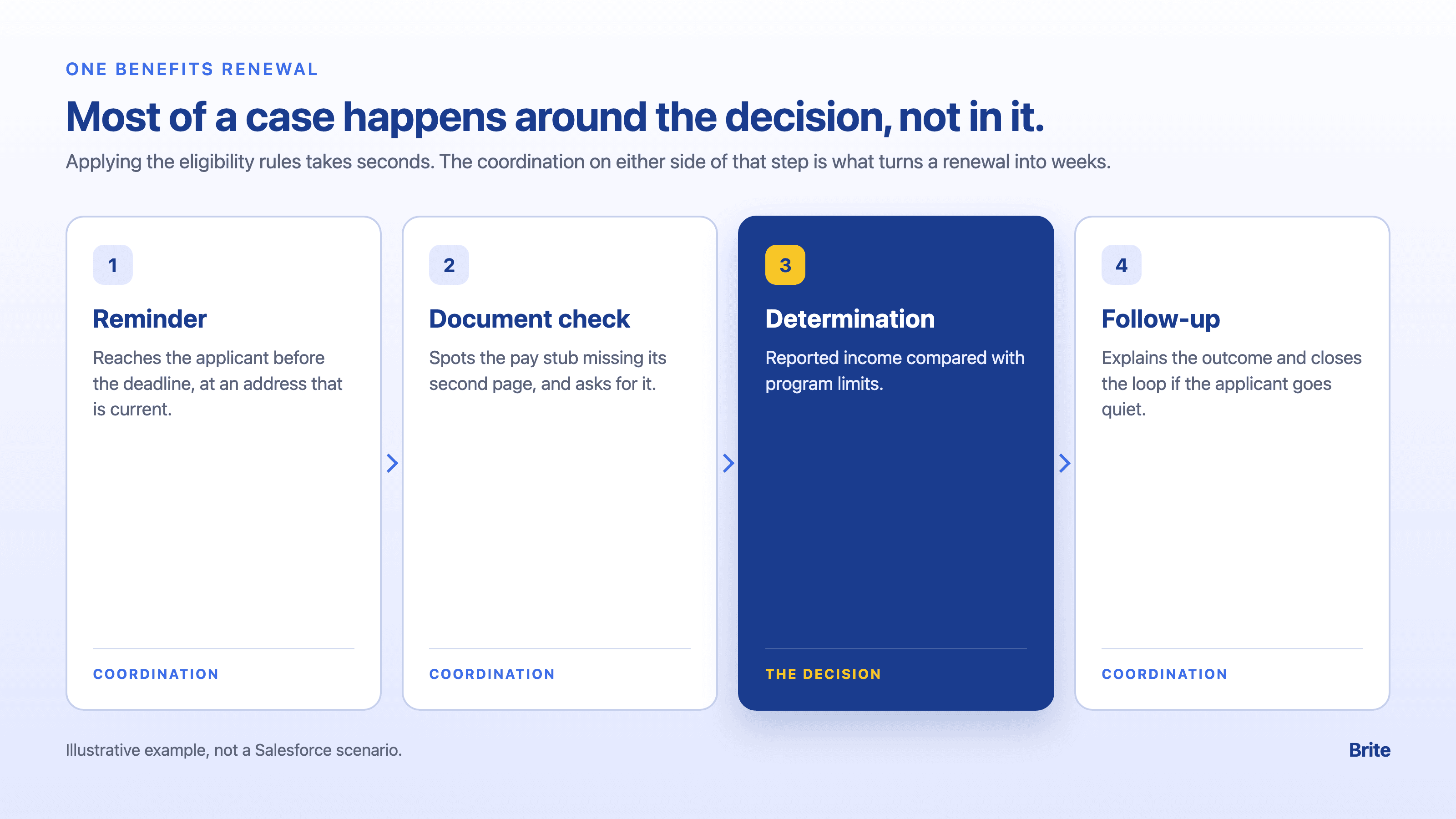
Picture a parent renewing her family’s benefits. Applying the eligibility rules takes seconds. Getting to that point takes three weeks: a reminder sent to an old address, a pay stub missing its second page, a callback that never came.
That gap between the decision and everything around it is where public programs lose time. It is also the kind of multistep work a reasoning model like Koa is built for. [1]
Our last post covered what Koa is and how Salesforce built it. This one follows that renewal through a program office to see which steps Koa should take on, and which belong to rules, to people, or to a different deployment.
Most of a case is coordination, not decision
The tasks Salesforce uses to benchmark Koa on its CRM Bench, such as routing a case and scheduling a follow-up, map closely onto the coordination that surrounds a program decision. [1] For a program office, that points to work like:
- Routing an incoming request to the right queue or team
- Pulling case history together before a caseworker opens the file
- Scheduling follow-ups and reminders across a long case
- Keeping context across a long conversation with a constituent
Here is an illustrative example of how that could look on the renewal. It expands the four steps above into six, adding the caseworker’s review and the explanation to the applicant.
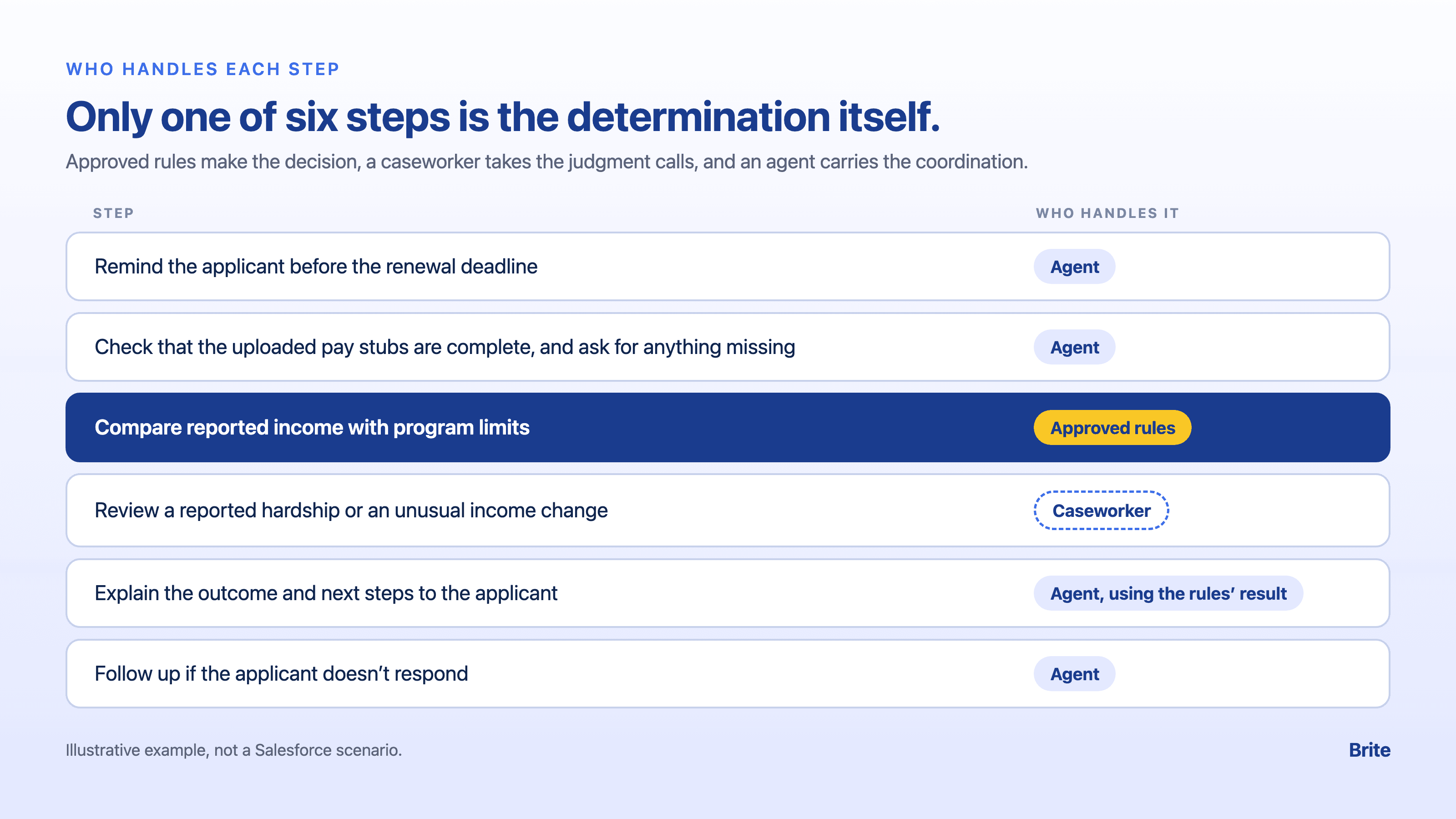
Only one of those six steps is the determination itself. The rest decides whether a case moves in days or in weeks. Consistency matters here for a reason sales teams rarely face: an applicant expects the same treatment whoever opens her file, and an auditor expects to see why.
The handoff is the feature that matters most
An agent that routes a hardship exception to a caseworker is more useful than one that resolves it confidently. If the parent adds a note that her hours were cut and she is behind on rent, that is a judgment call for a person. No document request will settle it.
That only works if escalation is designed in from the start. Before any pilot, write down which situations always go to a caseworker: hardship claims, appeals, and anything that changes a benefit amount. Then test that the agent sends them there, using real case scenarios rather than a demo script.
Every handoff should also leave a record. Log the reason the agent gave and the context it passed along. That way the caseworker doesn’t start from scratch, and an auditor can see why the case moved. Then have a supervisor review a sample of handoffs on a regular schedule, along with a sample of cases the agent kept. The cases the agent kept are where a missed escalation would hide.
Eligibility rules still belong in rules, not in a model
Koa reasons; it is not a rules engine. Salesforce’s own public-sector announcements reflect the same split. For policy, the Missionforce Policy Engine is designed to turn approved policy documents into structured, deterministic rules, with every output subject to human review and approval before deployment. Salesforce’s example is a state Medicaid program reevaluating a child’s coverage when a family’s income changes. Salesforce hasn’t announced when Policy Engine will be available. [2]
The practical takeaway: keep eligibility determinations in deterministic, auditable rules that a person has approved, and point a reasoning model at the work around them. A model can be consistent and well trained and still be the wrong place to encode a statute.
In practice, the pieces could divide the work like this: the agent gathers what the applicant submitted and checks it is complete, the approved rules make the determination, and the agent explains the outcome and next steps in plain language. The decision stays traceable to a rule a person approved. Salesforce hasn’t said whether agents running on Koa can call Policy Engine rules today, so raise it with Salesforce before planning around it.
If your data can’t leave your environment, look past Koa
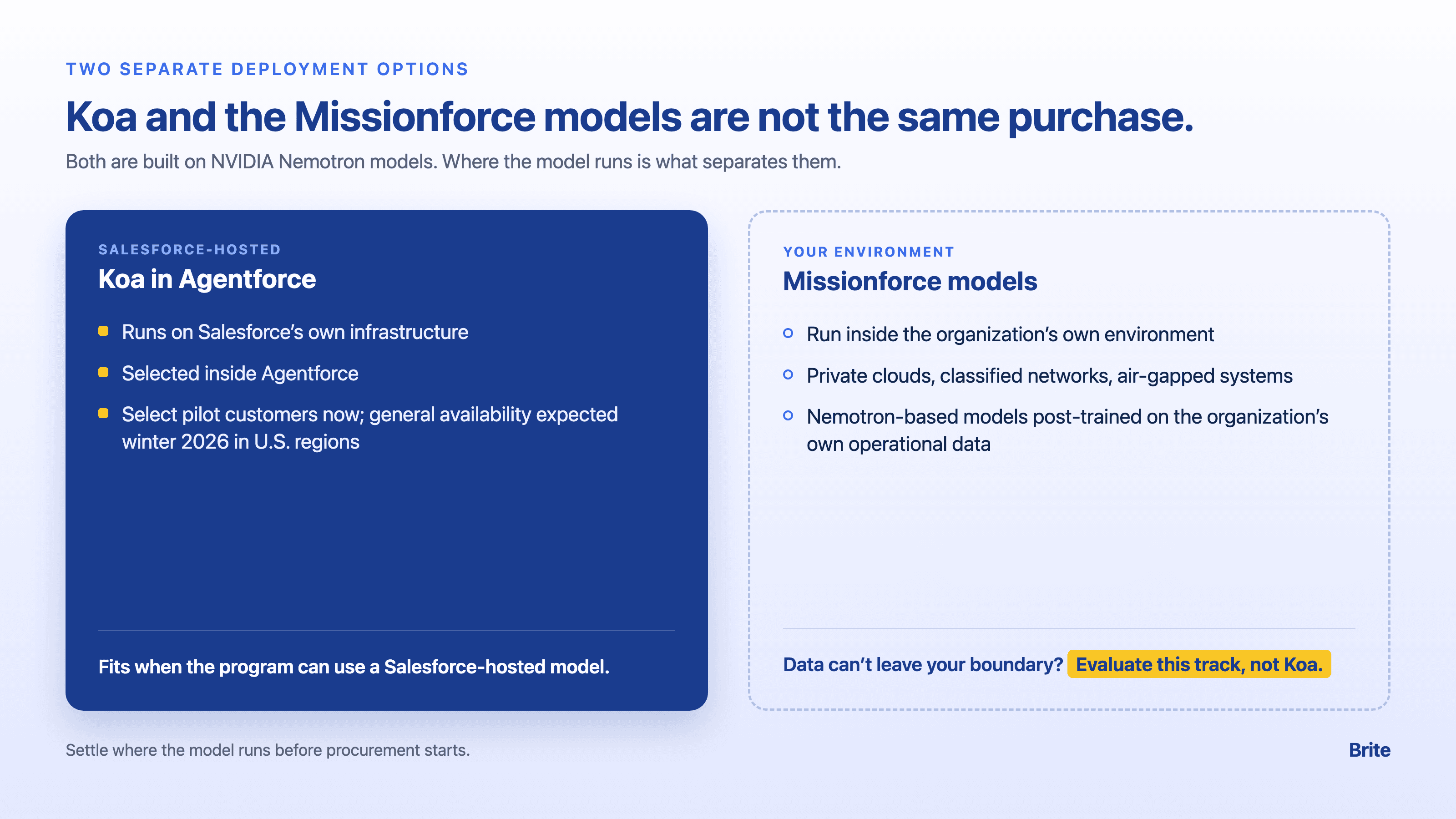
This is the point most likely to get confused. Koa runs on Salesforce’s own infrastructure, and Salesforce says no customer data was used to train it. For private clouds, classified networks, and air-gapped systems, Missionforce brings NVIDIA Nemotron-based models, post-trained on an organization’s own operational data. Salesforce said those would reach select customers in October 2026. Both are built on NVIDIA Nemotron models, but they are different deployments: Koa is hosted by Salesforce, while the Missionforce models run in the agency’s environment. [1] An agency that needs the model inside its own boundary should evaluate the Missionforce models instead. Confusing the two is an easy way to lose months in procurement.
Three questions settle this early:
- Where does the model run? On Salesforce’s infrastructure, in a government cloud, or inside the agency’s own environment.
- Where does the data sit while the agent works? And does that meet the program’s data-sharing agreements?
- Which offering covers the use case? Koa in Agentforce, or the Missionforce models.
Four questions Salesforce hasn’t answered for government yet
These aren’t red flags. They are the questions to bring to the first conversation with Salesforce.
- Was government in the training set? Salesforce says Koa’s training scenarios span more than 14 industries, and names four as examples (manufacturing, financial services, healthcare, and travel). Government isn’t among them, and Salesforce doesn’t say whether government workflows were included. [1][3]
- Has a public program tried it? None of the announced pilots is a public-sector organization. [1]
- Will it run in Government Cloud? Koa is with select pilot customers now. Salesforce expects general availability in winter 2026 in U.S. regions, and the announcement doesn’t mention Government Cloud or FedRAMP. [1]
- Does the benchmark reflect casework? Salesforce’s CRM Bench tasks are general CRM actions, such as updating an opportunity or routing a case, rather than public-program cases. [1]
How to evaluate Koa for a public program
Koa is still worth evaluating. Start with the program, then look at the model.
- Map the process first. Mark which steps are determinations, and which are coordination.
- Keep determinations in approved rules. Point any agent at the coordination steps around them.
- Decide where the model must run. If the answer is your own environment, the Missionforce track is the one to evaluate.
- Ask for evidence from your own work. Test on your program’s cases, not only on the vendor’s benchmark.
Then run a small pilot before scaling:
- Pick one coordination task. Routing or follow-up scheduling is a good start, because the results are easy to check.
- Measure what the program cares about. How often cases land in the right queue, how often the agent escalates and whether those escalations were warranted, and how long applicants wait for a first contact.
- Run it through a full cycle. A renewal or reporting period surfaces edge cases that a few weeks won’t.
- Set the bar before you start. Agree with program leadership on what results justify expanding, and what results end the pilot.
The model is the easy part
Go back to the parent and her benefits renewal. Koa won’t decide her case, and it shouldn’t. What it could do is make sure the reminder reaches her, the missing page gets flagged on day one, and her note about lost hours lands on a caseworker the same week.
That has little to do with how capable the model is. It depends on whether the program has drawn the lines first: which steps are coordination, which belong to rules, and which need a person.
Get those lines right, and the weeks spent around the decision are where the time comes back. Get them wrong, and the same model just moves the delay somewhere harder to see.
So before asking whether Koa is ready for your program, ask whether your program is ready to tell Koa where it stops.